

















What is Cloud Security? A Complete Guide to Securing Cloud Environments
Learn what cloud security is, why it matters, its key components, common threats, best practices, and how organizations secure cloud environments in 2026.


Introduction
Cloud computing has transformed the way organizations build, deploy, and manage applications. Businesses increasingly rely on cloud platforms to store data, host applications, support remote work, and deliver digital services at scale. Leading providers such as Amazon Web Services (AWS), Microsoft Azure, and Google Cloud Platform (GCP) enable organizations to innovate faster while reducing infrastructure costs.
However, moving to the cloud also introduces new security challenges. Misconfigured storage, weak identity controls, exposed APIs, insecure workloads, and unauthorized access can all lead to serious security incidents if not properly managed.
This is where cloud security becomes essential.
Cloud security is the practice of protecting cloud-based infrastructure, applications, workloads, identities, and data through a combination of technologies, policies, processes, and security controls. Its goal is to ensure that cloud environments remain secure, compliant, and resilient against cyber threats.
Whether an organization operates a public, private, or hybrid cloud, implementing strong cloud security measures is critical for protecting sensitive information and maintaining business continuity.
In this guide, you'll learn what cloud security is, why it is important, how it works, the different cloud service models, common threats, and best practices for securing modern cloud environments.
Table of Contents
- What is Cloud Security?
- Why is Cloud Security Important?
- How Cloud Security Works
- Cloud Deployment Models
- Cloud Service Models
- Core Components of Cloud Security
- Common Cloud Security Threats
- Cloud Security Best Practices
- Benefits of Cloud Security
- Frequently Asked Questions
What is Cloud Security?
Cloud security refers to the technologies, policies, procedures, and security controls used to protect cloud infrastructure, applications, workloads, and data from cyber threats, unauthorized access, and data breaches.
Unlike traditional on-premises environments, cloud platforms operate under a shared responsibility model, where both the cloud service provider and the customer share responsibility for maintaining security.
Cloud providers are generally responsible for securing the underlying infrastructure, while customers are responsible for protecting their applications, identities, configurations, and the data they store in the cloud.
A strong cloud security strategy includes identity and access management, encryption, continuous monitoring, vulnerability management, secure configuration, backup and recovery, and compliance management.
Why is Cloud Security Important?
Organizations are rapidly migrating critical workloads to the cloud because of its flexibility, scalability, and cost efficiency. However, as cloud adoption increases, attackers continue to target cloud environments looking for weak configurations and exposed services.
Cloud security helps organizations:
- Protect sensitive business and customer data
- Prevent unauthorized access
- Reduce the risk of data breaches
- Secure cloud workloads and applications
- Meet regulatory compliance requirements
- Improve business continuity
- Maintain customer trust
Without effective cloud security, even a small configuration mistake can expose thousands of sensitive records to the public internet.
How Cloud Security Works
Cloud security combines multiple layers of protection to secure cloud environments throughout their lifecycle.
These security controls work together to detect, prevent, and respond to cyber threats before they impact business operations.
Key cloud security functions include:
- Identity and Access Management (IAM)
- Multi-Factor Authentication (MFA)
- Data encryption
- Continuous monitoring
- Network segmentation
- Secure API management
- Security logging
- Threat detection
- Backup and disaster recovery
- Compliance monitoring
Rather than relying on a single security solution, organizations implement multiple layers of defense to reduce overall cyber risk.
Cloud Deployment Models
Organizations deploy cloud environments in different ways depending on their operational requirements, regulatory obligations, and business goals.
Public Cloud
A public cloud is operated by a third-party cloud provider and delivers computing resources over the internet.
Examples include:
- Amazon Web Services (AWS)
- Microsoft Azure
- Google Cloud Platform (GCP)
Public cloud environments offer high scalability, flexibility, and cost efficiency.
Private Cloud
A private cloud is dedicated to a single organization.
It provides greater control over infrastructure, security, and compliance, making it suitable for organizations handling highly sensitive information.
Hybrid Cloud
A hybrid cloud combines public cloud services with private infrastructure.
Organizations often use this model to balance scalability with security and compliance requirements.
Hybrid cloud environments require careful management to maintain consistent security policies across all platforms.
Multi-Cloud
Many organizations use services from multiple cloud providers instead of relying on a single vendor.
For example, a company may host applications on AWS while storing analytics workloads on Google Cloud and running enterprise services on Microsoft Azure.
Although multi-cloud improves flexibility, it also increases security complexity.
Cloud Service Models
Cloud providers offer different service models depending on how much infrastructure management the customer wants to handle.
Infrastructure as a Service (IaaS)
IaaS provides virtual servers, storage, networking, and other computing resources.
The customer manages:
- Operating systems
- Applications
- Security configurations
- User access
Examples include Amazon EC2 and Microsoft Azure Virtual Machines.
Platform as a Service (PaaS)
PaaS provides a managed platform for developing, testing, and deploying applications.
The cloud provider manages the infrastructure while customers focus primarily on application development.
Examples include Azure App Service and Google App Engine.
Software as a Service (SaaS)
SaaS delivers fully managed software applications over the internet.
Examples include:
- Microsoft 365
- Google Workspace
- Salesforce
Customers simply use the application while the provider manages the underlying infrastructure.
Understanding the Shared Responsibility Model
One of the most important concepts in cloud security is the Shared Responsibility Model. Many organizations assume that moving to the cloud means the cloud provider is responsible for all aspects of security. In reality, security responsibilities are shared between the cloud service provider and the customer.
Generally:
The Cloud Provider is responsible for:
- Physical data center security
- Network infrastructure
- Hardware maintenance
- Virtualization layer
- Availability of cloud services
The Customer is responsible for:
- Identity and Access Management (IAM)
- Application security
- Data protection
- User permissions
- Security configurations
- Operating systems (for IaaS)
- Encryption
- Compliance requirements
Understanding these responsibilities helps organizations avoid security gaps and misconfigurations that attackers commonly exploit.
Core Components of Cloud Security
An effective cloud security strategy combines multiple security controls that work together to protect cloud infrastructure and sensitive information.
1. Identity and Access Management (IAM)
Identity is one of the most critical security layers in cloud environments.
Identity and Access Management (IAM) controls who can access cloud resources and what actions they are allowed to perform.
Common IAM best practices include:
- Multi-Factor Authentication (MFA)
- Role-Based Access Control (RBAC)
- Least Privilege Access
- Strong password policies
- Identity federation
- Single Sign-On (SSO)
Organizations should regularly review user permissions to remove unnecessary access and reduce insider risks.
2. Data Encryption
Encryption protects sensitive information from unauthorized access, even if attackers gain access to cloud storage.
Cloud security typically uses two forms of encryption:
Encryption at Rest
Protects data stored in databases, storage buckets, and backups.
Encryption in Transit
Protects information while it travels across networks using secure communication protocols such as TLS.
Organizations should also implement secure key management to protect encryption keys.
3. Cloud Workload Protection
Cloud workloads include virtual machines, containers, databases, and serverless applications.
Protecting these workloads requires:
- Continuous vulnerability scanning
- Secure configurations
- Patch management
- Runtime protection
- Malware detection
- Endpoint monitoring
Workload protection helps organizations detect suspicious behavior before attackers can compromise cloud resources.
4. Cloud Security Posture Management (CSPM)
One of the most common causes of cloud breaches is configuration errors.
Cloud Security Posture Management (CSPM) solutions continuously monitor cloud environments for security misconfigurations.
Examples include:
- Publicly exposed storage buckets
- Unrestricted security groups
- Weak IAM permissions
- Disabled logging
- Missing encryption
- Compliance violations
CSPM enables organizations to identify and remediate risks before they become security incidents.
5. Network Security
Although cloud providers secure the underlying infrastructure, organizations remain responsible for protecting their cloud networks.
Cloud network security includes:
- Virtual Private Clouds (VPCs)
- Firewalls
- Network segmentation
- Security groups
- Network Access Control Lists (ACLs)
- Private endpoints
- VPN connectivity
Proper network segmentation limits attacker movement if a workload becomes compromised.
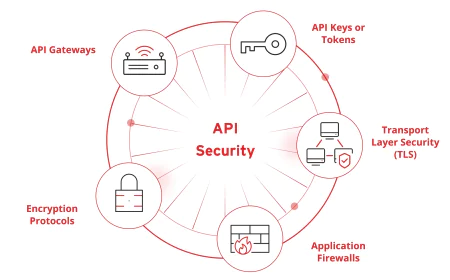
6. API Security
Cloud services rely heavily on APIs for communication between applications and infrastructure.
If APIs are poorly secured, attackers may gain unauthorized access to cloud resources.
Cloud API security focuses on:
- Authentication
- Authorization
- Rate limiting
- Input validation
- Secure API gateways
- Logging and monitoring
Organizations should continuously assess APIs for vulnerabilities and unauthorized access attempts.
7. Logging and Continuous Monitoring
Continuous monitoring enables organizations to detect suspicious activity before it develops into a major security incident.
Cloud monitoring typically includes:
- User activity logs
- Login attempts
- API requests
- Configuration changes
- Network traffic
- Threat detection alerts
Centralized logging helps security teams investigate incidents and maintain compliance with regulatory requirements.
Container and Kubernetes Security
Modern cloud-native applications frequently use containers and Kubernetes to improve scalability and deployment speed.
While these technologies provide operational benefits, they also introduce new security considerations.
Key security practices include:
- Scanning container images for vulnerabilities
- Securing Kubernetes clusters
- Protecting container registries
- Enforcing least privilege permissions
- Monitoring container runtime activity
- Applying network policies
Organizations should integrate container security into every stage of the software development lifecycle.
DevSecOps and Cloud Security
Traditional security practices often occur after software has already been developed.
DevSecOps integrates security directly into the development lifecycle so that vulnerabilities can be identified and resolved earlier.
A DevSecOps approach includes:
- Secure coding practices
- Automated security testing
- Infrastructure as Code (IaC) scanning
- Secret management
- Continuous vulnerability assessment
- Automated compliance checks
By shifting security earlier in the development process, organizations reduce risk while accelerating software delivery.
Cloud Security Challenges
Despite the advantages of cloud computing, organizations continue to face several security challenges.
Some of the most common include:
Misconfigured Cloud Resources
Improperly configured storage buckets, databases, or security groups remain one of the leading causes of cloud data breaches.
Weak Identity Controls
Excessive permissions, weak passwords, and the absence of Multi-Factor Authentication increase the risk of unauthorized access.
Insecure APIs
Poorly secured APIs may expose sensitive information or allow attackers to manipulate cloud applications.
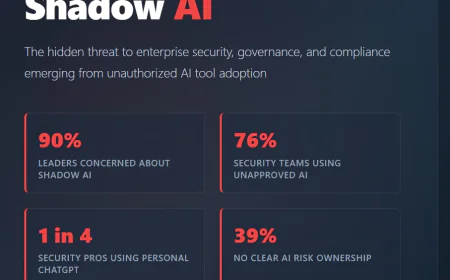
Shadow IT
Employees sometimes use unauthorized cloud services without approval from the IT department, creating unmanaged security risks.
Compliance Requirements
Organizations operating across different regions must comply with various data protection and privacy regulations, making cloud governance more complex.
Lack of Visibility
As cloud environments grow, maintaining visibility across multiple accounts, services, and workloads becomes increasingly difficult without centralized monitoring.
Cloud Security Best Practices
Implementing cloud services alone does not guarantee security. Organizations must adopt a proactive approach that combines technology, governance, and continuous monitoring to protect cloud environments from evolving cyber threats.
The following best practices help organizations strengthen their cloud security posture.
1. Enable Multi-Factor Authentication (MFA)
Passwords alone are no longer sufficient to protect cloud accounts. Enabling Multi-Factor Authentication (MFA) significantly reduces the risk of unauthorized access by requiring users to verify their identity through an additional authentication factor.
MFA should be mandatory for:
- Administrator accounts
- Cloud console access
- Remote users
- Privileged accounts
2. Follow the Principle of Least Privilege
Users should only receive the permissions necessary to perform their job responsibilities.
Regularly reviewing and removing unnecessary permissions helps reduce the attack surface and minimizes the impact of compromised accounts.
3. Encrypt Sensitive Data
Organizations should encrypt sensitive information both at rest and in transit.
Encryption protects customer information, financial records, intellectual property, and confidential business data, even if unauthorized access occurs.
4. Continuously Monitor Cloud Environments
Cloud environments change frequently as new resources are created, modified, or removed.
Continuous monitoring helps detect:
- Suspicious login attempts
- Configuration changes
- Unauthorized access
- Malware activity
- Unusual network traffic
- Compliance violations
Real-time visibility enables security teams to respond quickly to potential threats.
5. Regularly Patch Systems
Outdated operating systems, applications, and third-party software often contain known vulnerabilities.
Organizations should implement a structured patch management process to ensure cloud workloads remain protected against newly discovered security flaws.
6. Secure APIs
Since modern cloud applications depend heavily on APIs, organizations should:
- Require authentication
- Validate input
- Implement rate limiting
- Monitor API activity
- Disable unused endpoints
API security should be integrated into every stage of the application lifecycle.
7. Perform Regular Security Assessments
Organizations should regularly perform:
- Vulnerability Assessments
- Penetration Testing
- Configuration Reviews
- Cloud Security Audits
Regular testing helps identify weaknesses before attackers can exploit them.
Benefits of Cloud Security
A strong cloud security strategy delivers both security and business benefits.
Protects Sensitive Information
Cloud security safeguards customer records, business data, financial information, and intellectual property against unauthorized access.
Improves Regulatory Compliance
Organizations can better meet compliance requirements such as GDPR, ISO 27001, SOC 2, and other industry standards by implementing proper cloud security controls.
Reduces Cyber Risk
Continuous monitoring, strong access controls, and secure configurations significantly reduce the likelihood of successful cyberattacks.
Supports Business Continuity
Secure backup strategies, disaster recovery planning, and resilient cloud infrastructure help organizations recover quickly from security incidents.
Strengthens Customer Trust
Customers expect organizations to protect their information. Demonstrating strong cloud security practices enhances credibility and builds long-term trust.
Common Cloud Security Tools
Organizations use a variety of security solutions to protect cloud environments.
Some commonly used tools and technologies include:
| Tool / Technology | Purpose |
|---|---|
| AWS Security Hub | Centralized AWS security management |
| Microsoft Defender for Cloud | Multi-cloud security monitoring |
| Google Security Command Center | Google Cloud threat detection |
| Prisma Cloud | Cloud security posture management |
| Wiz | Cloud security and risk visibility |
| Lacework | Cloud workload protection |
| CrowdStrike Falcon Cloud Security | Cloud workload protection |
| Terraform | Infrastructure as Code (IaC) automation |
| Kubernetes | Container orchestration |
| Docker | Secure container deployment |
The choice of tools depends on the organization's cloud platform, regulatory requirements, and security maturity.
How IntelligenceX Helps Organizations Secure Cloud Environments
As organizations expand their cloud infrastructure, securing cloud environments requires more than technology alone. Effective cloud security depends on proper architecture, secure configurations, continuous monitoring, and ongoing risk assessments.
IntelligenceX provides cloud security services designed to help organizations strengthen their security posture across public, private, and hybrid cloud environments.
These services include:
- Cloud Security Assessments
- Cloud & DevSecOps Consulting
- Penetration Testing
- Managed Detection & Response (MDR)
- Incident Response
- Compliance Assessments
By combining proactive security testing with continuous monitoring and governance, organizations can reduce cyber risk while maintaining operational resilience.
Conclusion
Cloud computing has become the foundation of modern digital transformation, but securing cloud environments requires continuous attention and a layered security strategy.
Organizations must protect identities, applications, workloads, APIs, and data while maintaining visibility across increasingly complex cloud environments.
By implementing strong access controls, encryption, continuous monitoring, secure development practices, and regular security assessments, businesses can significantly reduce cyber risk and improve resilience.
Cloud security is not a one-time project - it is an ongoing process that evolves alongside changing technologies and emerging cyber threats.
Frequently Asked Questions (FAQs)
1. What is cloud security?
Cloud security is the practice of protecting cloud infrastructure, applications, workloads, identities, and data from cyber threats through security controls, policies, and continuous monitoring.
2. Why is cloud security important?
It helps organizations protect sensitive information, reduce cyber risk, maintain compliance, and ensure business continuity.
3. What is the Shared Responsibility Model?
It is a cloud security model where the cloud provider secures the infrastructure while customers are responsible for securing their data, identities, applications, and configurations.
4. What are the biggest cloud security risks?
Common risks include misconfigured cloud resources, weak identity management, insecure APIs, exposed storage, insider threats, and compromised credentials.
5. What is Identity and Access Management (IAM)?
IAM is a framework that controls who can access cloud resources and what actions they are authorized to perform.
6. What is Cloud Security Posture Management (CSPM)?
CSPM continuously monitors cloud environments to detect misconfigurations, compliance issues, and security risks.
7. How often should cloud security assessments be performed?
Organizations should perform assessments regularly and after significant infrastructure changes or new cloud deployments.
8. Is cloud security only the cloud provider's responsibility?
No. Cloud security follows a Shared Responsibility Model, meaning both the provider and the customer have defined security responsibilities.
9. Which industries benefit from cloud security?
Healthcare, finance, government, manufacturing, education, retail, technology, and any organization using cloud services benefit from strong cloud security.
10. What is the difference between cloud security and cybersecurity?
Cybersecurity is the broader practice of protecting digital systems and information, while cloud security specifically focuses on securing cloud-based infrastructure, applications, and data.