


















OWASP Top 10 2025 Complete Guide
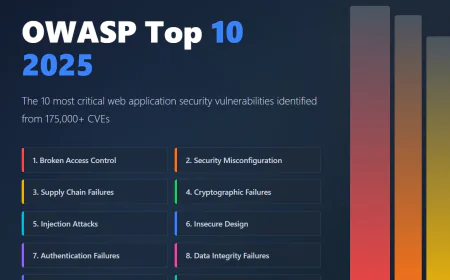
Comprehensive but easy-to-understand guide to all 10 OWASP Top 10 2025 vulnerabilities including Broken Access Control, Security Misconfiguration, Software Supply Chain Failures, Cryptographic Failures, Injection, Insecure Design, Authentication Failures, Data Integrity, Security Logging, and Exceptional Conditions with prevention steps.

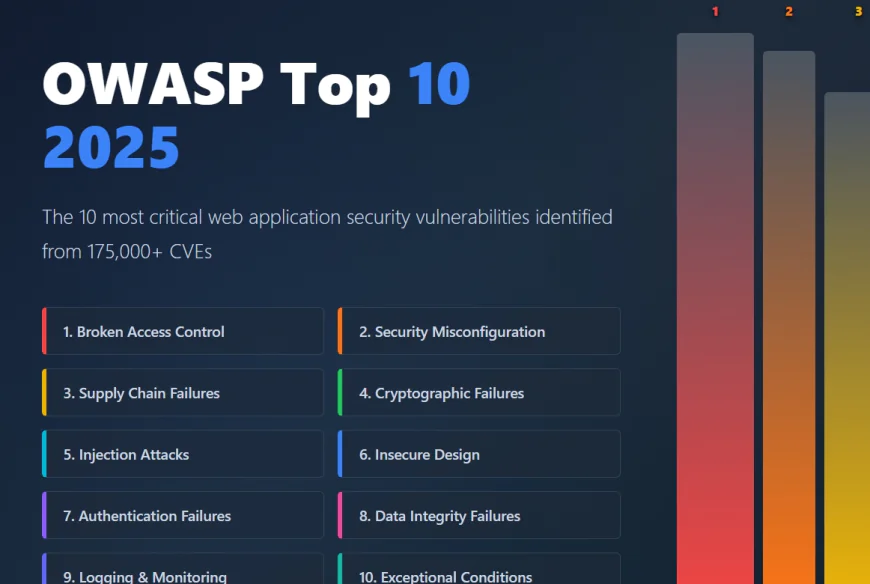
The OWASP Top 10 is a list of the 10 most dangerous security weaknesses found in web applications. Think of it like a "Most Wanted" list of bad guys that attackers are constantly trying to exploit.
OWASP stands for Open Web Application Security Project, a nonprofit organization that helps make software more secure. Every few years, they release an updated list showing which vulnerabilities are most common and dangerous.
Why does this matter? Because if you're a developer, tester, business owner, or just someone who uses web applications, understanding these vulnerabilities helps you protect yourself and your organization.
Nearly 50 percent of all web applications contain at least one vulnerability from this list. That's not a theoretical problem. That's real risk affecting real people every day.
The 2025 edition was just released in November 2025, based on analyzing over 175,000 CVEs (Common Vulnerabilities and Exposures) and feedback from security professionals worldwide.
The 10 OWASP Top 10 Vulnerabilities for 2025
1. Broken Access Control (A01:2025)
What It Means in Simple Terms:
Imagine a bank where anyone could walk into the vault, take out money, and walk away. No one checks whether you're allowed to be there. That's broken access control. It's when a system fails to properly verify what you're allowed to do.
Real-World Example:
You're logged into your banking app and you can view your account balance at this URL: yourbank.com/account?user_id=1234
An attacker notices the user_id in the URL and tries changing it: yourbank.com/account?user_id=5678
If the bank doesn't properly check whether you're allowed to see user 5678's account, the attacker sees someone else's financial information. This is called an insecure direct object reference (IDOR).
How Attackers Exploit It:
Changing URLs or parameters to access other people's data
Accessing admin features without being an admin
Performing actions (like deleting accounts) you shouldn't be able to perform
Manipulating tokens or session cookies to impersonate others
How to Prevent It:
Always verify that users can only access what they're supposed to access
Use proper authentication and authorization checks on every single action
Create different user roles (admin, user, guest) with appropriate permissions
Log all access attempts so you can detect suspicious behavior
Test your access controls thoroughly
2. Security Misconfiguration (A02:2025)
What It Means in Simple Terms:
Security misconfiguration is when you set up your application incorrectly, leaving doors wide open for attackers. It's like having a security system but forgetting to turn it on.
This became the #2 vulnerability in 2025, jumping from #5 in the previous list.
Real-World Example:
You deploy a web application but forget to:
Remove default admin credentials (username: admin, password: admin)
Turn off debug mode (which shows detailed error messages revealing sensitive information)
Disable directory listing (so attackers can see all files on the server)
Configure proper file permissions (so sensitive files are readable by anyone)
Remove example/test files from production
Any of these mistakes gives attackers an easy way in.
How Attackers Exploit It:
Using default credentials to log in as admin
Reading verbose error messages that leak information about your system
Accessing sample files left behind during development
Modifying configuration files
Reading sensitive information from exposed .env files or config files
How to Prevent It:
Use automated tools that check for misconfiguration
Never leave default usernames and passwords
Turn off debug mode in production
Use a minimal configuration with only what you need enabled
Regularly audit your systems to find misconfigurations
Use configuration management tools to ensure consistent, secure setups
3. Software Supply Chain Failures (A03:2025)
What It Means in Simple Terms:
Your application doesn't exist in isolation. It uses libraries, frameworks, and tools from other companies. If any of those libraries are compromised (infected with malicious code), your entire application becomes compromised.
Think of it like the water supply. Your home has clean water because the water utility companies ensure purity at their facilities and in the pipes. If someone poisons the water at the source, everyone using that water gets poisoned.
Real-World Example:
You build an application using thousands of open-source libraries (this is normal). One of these libraries gets compromised by attackers who inject malicious code. You update your library to the latest version without realizing it's been poisoned. Your application now contains malicious code.
This actually happened in 2020 with SolarWinds, where 18,000 organizations unknowingly installed malicious updates.
How Attackers Exploit It:
Compromising popular open-source libraries and injecting malicious code
Attacking the development environment where libraries are built
Intercepting downloads to insert malicious code
Creating fake versions of popular libraries with slightly misspelled names
Compromising the build servers that create software updates
How to Prevent It:
Keep a detailed list of all libraries and dependencies your application uses (called SBOM - Software Bill of Materials)
Regularly scan dependencies for known vulnerabilities
Use tools that verify the integrity of downloads
Only download from official sources
Pin your dependency versions so you're not automatically downloading updates without review
Monitor security advisories for libraries you use
Use private/internal repositories if possible to maintain control
4. Cryptographic Failures (A04:2025)
What It Means in Simple Terms:
Cryptography is the math that protects sensitive information like passwords, credit card numbers, and personal data. Cryptographic failures happen when this protection is broken, outdated, or improperly implemented.
Real-World Example:
A website stores passwords using an old encryption method from the 1990s. Today's computers are so fast they can break this encryption in minutes. An attacker hacks the database and quickly decrypts all the passwords.
Another example: A website sends your credit card number over regular HTTP (unencrypted) instead of HTTPS. Attackers on the same WiFi network intercept it and steal your card number.
How Attackers Exploit It:
Breaking weak encryption
Intercepting unencrypted data sent over the internet
Using decrypted data from stolen databases
Finding hardcoded encryption keys in source code
Using outdated encryption algorithms
How to Prevent It:
Always use HTTPS for any data transmission
Never store passwords in plain text or using weak encryption
Use modern encryption algorithms (AES-256 for symmetric, RSA-2048+ for asymmetric)
Use strong, randomly generated encryption keys
Encrypt sensitive data at rest (when stored) and in transit (when traveling)
Never hardcode encryption keys in your code
Use proper key management systems
5. Injection (A05:2025)
What It Means in Simple Terms:
Injection happens when an attacker puts malicious code into your application through user input. The application then executes this malicious code thinking it's legitimate.
Think of it like telling a restaurant to "make me pasta" but actually saying "make me pasta, then send all customer credit card numbers to the attacker's server". If the restaurant just follows the instructions literally, it will do both.
Real-World Example:
You have a login form with username and password fields. An attacker enters: admin' -- as the username.
If the application builds a database query like this:
SELECT * FROM users WHERE username = 'admin' --' AND password = '...'
The -- character in SQL means "ignore everything after this". So the query becomes:
SELECT * FROM users WHERE username = 'admin'
The attacker logs in as admin without knowing the password.
How Attackers Exploit It:
SQL Injection (manipulating database queries)
NoSQL Injection (manipulating database queries in NoSQL databases)
Cross-site Scripting (XSS) - injecting malicious JavaScript
Command Injection (executing system commands)
LDAP Injection (manipulating directory services)
How to Prevent It:
Never directly include user input in queries or commands
Use prepared statements or parameterized queries
Validate and sanitize all user input
Use allowlists to only accept expected input
Never trust user input, ever
Use web application firewalls to detect injection attempts
6. Insecure Design (A06:2025)
What It Means in Simple Terms:
Insecure design means the fundamental architecture and business logic are flawed from the beginning. It's not a coding mistake. It's a design mistake.
Real-World Example:
An online store has a password reset feature that doesn't verify your identity well. An attacker could reset anyone's password by just knowing their username. This isn't a bug in the code, it's a flawed design.
Another example: An e-commerce site lets you manipulate the price before checkout. An attacker changes the price of a $500 item to $0.01 and completes the purchase. The design didn't include proper validation.
How Attackers Exploit It:
Exploiting weak password reset mechanisms
Manipulating business logic (like changing prices)
Bypassing authorization checks designed poorly
Finding loopholes in workflows
How to Prevent It:
Use threat modeling to think about how attackers might abuse your system
Document and review security requirements
Have security reviews before implementation, not after
Test edge cases and unusual scenarios
Validate all data and transactions on the server side
Implement proper authorization checks in business logic
7. Authentication Failures (A07:2025)
What It Means in Simple Terms:
Authentication is how you prove you're really you. Failures happen when this protection is weak. It's like a bouncer at a club who accepts a fake ID.
Real-World Example:
A website lets you change your password without entering your current password. An attacker can just change someone else's password without permission.
Another example: A website doesn't use two-factor authentication (2FA) for important actions. An attacker gets your password and gains full access.
How Attackers Exploit It:
Using weak or common passwords
Brute-forcing password attempts without limits
Reusing usernames/passwords across sites
Session hijacking (stealing session tokens)
Lack of two-factor authentication
How to Prevent It:
Require strong passwords (minimum length, complexity)
Implement rate limiting (limit login attempts)
Use two-factor authentication for important actions
Properly manage sessions (timeout, invalidation)
Don't store passwords in plain text (use hashing)
Use proper authentication libraries instead of building your own
8. Data Integrity and Verification Failures (A08:2025)
What It Means in Simple Terms:
Data integrity means your data is trustworthy and hasn't been tampered with. Failures occur when you don't verify that data is legitimate.
Real-World Example:
A software library is updated without any verification. An attacker intercepts the download and replaces it with malicious code. You install the "update" and your system is now compromised.
Another example: An application deserializes (converts) data from users without checking if it's safe. An attacker sends specially crafted data that executes malicious code.
How Attackers Exploit It:
Tampering with software updates
Manipulating serialized data
Modifying configuration files
Creating fake plugins or extensions
How to Prevent It:
Verify digital signatures on all updates
Check integrity with checksums or hashes
Safely deserialize data (or avoid it altogether)
Use secure serialization formats
Control which plugins and extensions can be used
Sign all important data
9. Security Logging and Monitoring Failures (A09:2025)
What It Means in Simple Terms:
Logging is recording what happens in your application. Monitoring is watching those logs to detect suspicious activity. Failures happen when you don't log important events or don't monitor the logs.
Real-World Example:
An attacker breaks into your system and deletes the logs that would show what they did. Nobody knows an attack happened.
Another example: Your application logs everything, but nobody ever looks at the logs. An attacker could be stealing data for months and nobody notices.
How Attackers Exploit It:
Performing attacks without leaving evidence (because logging is disabled)
Deleting logs after breaking in
Knowing that no one monitors for suspicious activity
How to Prevent It:
Log all important events (logins, failed logins, data access, privilege changes)
Send logs to a secure location where they can't be deleted
Monitor logs in real-time for suspicious patterns
Alert security teams when suspicious activity is detected
Keep logs for adequate periods (typically 1-2 years minimum)
Protect logs with strong access controls
10. Mishandling of Exceptional Conditions (A10:2025) - NEW!
What It Means in Simple Terms:
This is a brand new category for 2025. It covers what happens when your application encounters errors or unexpected situations. If error handling is bad, attackers can exploit these edge cases.
Real-World Example:
Your application crashes when it runs out of disk space. An attacker fills up the disk and crashes your service (denial of service).
Another example: Your application displays detailed error messages showing database passwords or system information. An attacker uses this information to plan further attacks.
How Attackers Exploit It:
Sending unexpected input that causes errors
Reading sensitive information from error messages
Triggering out-of-memory errors
Causing resource exhaustion
Using error conditions to bypass security checks
How to Prevent It:
Handle all exceptions gracefully (don't crash)
Never show detailed error messages to users
Log detailed errors internally for debugging
Define what "secure failure" means (usually deny access)
Test with extreme inputs and edge cases
Implement resource limits to prevent exhaustion
Key Changes from 2021 to 2025
Several important changes happened in the 2025 update:
Software Supply Chain Failures (A03) was introduced to address the growing risk of compromised dependencies.
Mishandling of Exceptional Conditions (A10) was introduced as a brand new concern for 2025.
Security Misconfiguration jumped from #5 to #2, showing how critical proper configuration is.
Server-Side Request Forgery (SSRF) was merged into Broken Access Control.
The list now emphasizes root causes instead of symptoms. For example, instead of "Sensitive Data Exposure" (symptom), it now says "Cryptographic Failures" (root cause).
How to Use This Information
If you're a Developer:
Start learning about these 10 vulnerabilities. Understand how they work and how to prevent them.
Use automated tools like SAST (Static Application Security Testing) to find these vulnerabilities in your code.
Write code with security in mind from the beginning.
If you're in QA or Testing:
Test for these vulnerabilities in applications you're testing.
Run penetration tests focused on these categories.
Report findings to developers with clear explanations.
If you're a Business Owner or Manager:
Ensure your development team is trained on these vulnerabilities.
Implement secure development practices.
Budget for security testing and tools.
Make security part of your culture, not an afterthought.
If you're Just Learning About Security:
This list shows you the most important things to learn about.
Start with #1 (Broken Access Control) and work your way down.
Use free resources like OWASP WebGoat for hands-on learning.
Practice on intentionally vulnerable applications like DVWA or WebGoat.
Conclusion
The OWASP Top 10 2025 shows us that web application security continues to evolve. Traditional code vulnerabilities are still present, but new challenges like supply chain attacks and misconfigurations are becoming increasingly critical.
The good news is that all of these vulnerabilities are preventable. By understanding what they are, how attackers exploit them, and how to defend against them, you can significantly improve your security posture.
Remember: security is not a destination, it's a journey. Keep learning, keep improving, and keep your applications secure.