












Two-Factor Authentication (2FA): Security Implications, Bypass Techniques, and Defense Strategies
Comprehensive analysis of two-factor authentication vulnerabilities covering SMS OTP interception, phishing-resistant methods, SIM swapping, push notification abuse, MFA fatigue attacks, backup code theft, session hijacking, and implementation flaws with detailed examples and prevention strategies.

Introduction: When 2FA Isn't Really Two Factors
Two-factor authentication has become the gold standard for account security. Use your password plus a second factor, and you're protected against most account takeovers.
Except that's not always true.
Two-factor authentication is effective at preventing many basic attacks. But when researchers test real-world 2FA implementations, they consistently discover that it doesn't fail at the factor itself. It fails everywhere around it: in how codes are delivered, in how users interact with the system, in the recovery mechanisms, and in how sessions are managed after successful authentication.
The critical truth that organizations miss: attackers don't break 2FA. They exploit the weak links around it.
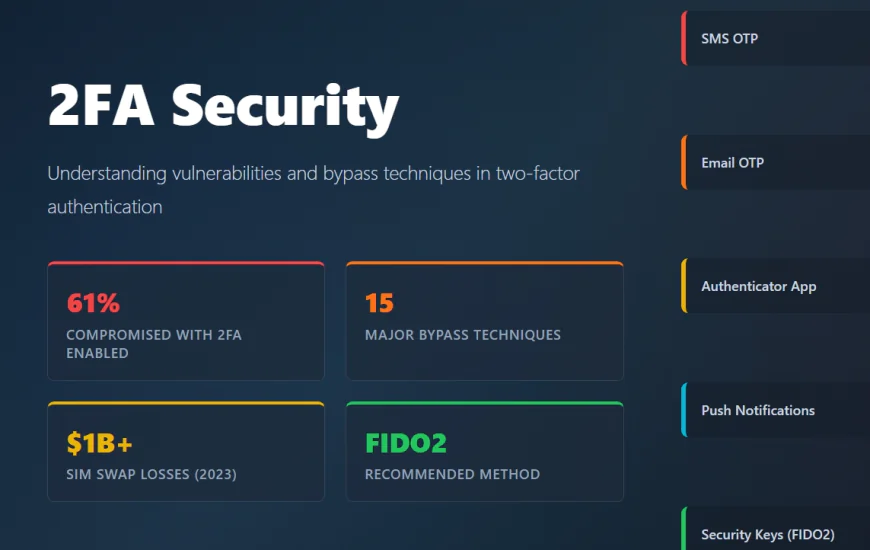
A 2025 report from LoginRadius revealed that despite 76 percent of organizations implementing 2FA, over 61 percent of account compromises happen on accounts protected by 2FA. This isn't because the factor itself failed. It's because the surrounding system was exploitable.
This guide covers every major 2FA vulnerability and bypass technique discovered in 2025, explaining why each works and how to defend against it.
Understanding 2FA: The Two Things
Before diving into vulnerabilities, understand what 2FA actually protects against.
2FA requires something you know (a password) plus something you have (a phone, security key, or authenticator app) or something you are (a fingerprint, face).
The idea is elegant: even if someone steals your password, they can't get in without the second thing.
But this protection only works if the entire system around these two factors is secure. And in practice, most systems have flaws.
The Security Implications: Why 2FA Matters
2FA provides three main security benefits when properly implemented:
Protection Against Credential Stuffing and Brute Force: If an attacker has your password (from a breach, brute force, or phishing), they still need your second factor to proceed. This stops the vast majority of automated account takeover attacks.
Defense Against Phishing: Even if you give your password to a phishing site, the attacker can't use it without also getting the second factor. This stops many phishing attacks cold.
Account Recovery Protection: If someone tries to reset your password (which can sometimes be done without the old password), 2FA often blocks this unless the second factor is also provided.
However, these benefits evaporate when 2FA implementation has flaws.
2FA Methods Ranked by Security (Weakest to Strongest)
Not all 2FA methods offer equal protection. Here's the ranking from weakest to strongest:
1. SMS-Based OTP (Weakest)
SMS is extremely convenient but vulnerable to SIM swapping, SMS interception, and phishing. An attacker can trick the phone company into switching your number to their SIM, then intercept SMS codes.
2. Email-Based OTP
Email codes are more secure than SMS (email can't be SIM swapped) but still vulnerable to phishing and email compromise.
3. Authenticator Apps (TOTP)
Google Authenticator, Microsoft Authenticator, and similar apps generate time-based codes that don't travel over SMS. Much stronger than SMS. Vulnerable to phishing (real-time interception), device compromise, and certain backup code attacks.
4. Push Notifications
Applications send a push notification asking "Do you approve this login?" Much better UX and resistant to phishing because the user explicitly approves. Vulnerable to MFA fatigue (asking repeatedly until users say yes) and device compromise.
5. Hardware Security Keys (Strongest)
FIDO2 or WebAuthn security keys are cryptographically bound to the domain you're logging into. Nearly impossible to phish because the key won't work on fake domains. This is the gold standard.
6. Biometric + Hardware (Strongest)
Combining biometric authentication (fingerprint, face) with hardware keys provides maximum security.
The key insight: SMS and email are dramatically less secure than app-based and hardware-based methods. Yet many organizations still rely on them.
15 Major 2FA Bypass Techniques and Vulnerabilities
1. Phishing and Real-Time Code Interception (Adversary-in-the-Middle/AitM)
This is currently the most effective way to bypass 2FA in the wild.
How it works:
An attacker sends you a convincing phishing email (or uses ads, social engineering, etc.) pointing to a fake login page that looks identical to the real site. You enter your username and password on the fake page. The attacker captures these credentials and immediately forwards them to the real site, triggering a 2FA code. Your real 2FA code is now being sent to your phone. On the fake page, an input field appears asking for your 2FA code. You enter the code from your phone, thinking you're completing a legitimate login. The attacker sees this code and immediately enters it on the real site, gaining access.
Modern phishing kits automate this entire process. Services called "Phishing-as-a-Service" (PhaaS) like Salty 2FA specifically target 2FA by setting up sophisticated proxy infrastructure that relays your credentials and 2FA codes to the real site in real-time.
Example: A realistic Gmail login page that captures your password and 2FA codes in real-time.
Defense: Use FIDO2 security keys or hardware tokens. These cannot be phished because they cryptographically verify the domain. Regular authentication apps and SMS are vulnerable.
2. SIM Swapping
This is one of the most effective real-world attacks.
How it works:
An attacker calls your mobile provider (T-Mobile, Verizon, etc.) impersonating you. They claim they lost their SIM card and need it transferred to a new phone. Social engineering the carrier employee into transferring your phone number to a SIM they control. Now all SMS messages intended for you go to their phone. Your 2FA codes arrive at their phone instead of yours. They use the codes to access your accounts.
This attack is particularly effective because:
Most carriers are poorly trained to verify identity over the phone
Attackers have sophisticated social engineering scripts
2FA codes from banks are sent via SMS, giving immediate access to banking
Real-world example: In 2023, SIM swapping attacks stole over $1 billion from cryptocurrency users.
Defense: Don't use SMS-based 2FA if possible. Use authenticator apps instead. Enable carrier lock (PIN-protected SIM changes) with your provider.
3. MFA Fatigue (Push Notification Abuse)
Push notification-based MFA is generally secure, until attackers abuse it through sheer volume.
How it works:
An attacker has your password (from phishing, breach, or brute force). They attempt to log in to your account dozens of times. Each login attempt triggers a push notification to your phone asking "Do you approve this login?" After many notifications over minutes or hours, you become fatigued. You may accidentally approve one out of fatigue, frustration, or misunderstanding. The attacker gains access.
This is extraordinarily effective because:
It's exhausting to keep denying notifications
Humans make mistakes under pressure
Some users approve without thinking
Real-world example: The 2022 Uber breach involved attackers using MFA fatigue to gain access to internal systems after obtaining an employee's password.
Defense: Authenticate through dedicated authenticator apps instead of push notifications. Implement velocity checks that block authentication after multiple failed attempts.
4. Brute-Force Attacks Without Rate Limiting
Many 2FA implementations fail to implement rate limiting on code attempts.
How it works:
After the attacker enters your password, your account prompts for a 2FA code. The attacker writes a script that rapidly submits all possible 2FA codes (typically 0000-9999 for 4-digit codes or 000000-999999 for 6-digit codes). Without rate limiting, the script might submit hundreds of attempts per second. Within minutes, the correct code is found.
Example:
POST /verify-2fa
Attempts: 0000, 0001, 0002, 0003 ... 9999
No rate limiting = all attempts complete in seconds
Defense: Implement strict rate limiting (maximum 5 attempts before temporary lockout). Add exponential backoff (increasing wait times between attempts). Log all attempts for monitoring.
5. Backup Code Theft and Mismanagement
Organizations often provide backup codes for 2FA recovery ("If you lose your phone, use these codes").
How it works:
Backup codes are often:
Stored in plain text in user accounts
Written down and left on sticky notes
Shared in email or messaging systems
Stored in the user's notes or password manager (where they can be recovered from breach)
An attacker gains access to these codes and uses them to bypass 2FA entirely.
Example: A user stores 2FA backup codes in their Google Notes, which also uses their Gmail account. If the Gmail account is compromised, the codes are immediately available.
Defense: Never display backup codes on-screen (email them instead). Use single-use codes with tracking. Force users to acknowledge they've secured codes. Invalidate codes after use.
6. OAuth Integration Vulnerabilities
Many applications let you log in using a third-party account (Facebook, Google, LinkedIn).
How it works:
The primary application might have 2FA enabled. But if the OAuth provider (Facebook) has weaker 2FA or security, attackers can bypass the primary app's 2FA by logging in through the weaker provider.
Example:
A financial app requires 2FA on direct login but allows Google login as an alternative. An attacker compromises the victim's Google account (which uses weaker SMS-based 2FA). They log into the financial app using Google login, bypassing the financial app's stronger 2FA requirements.
Defense: Enforce consistent 2FA policies across all login methods. Don't allow weaker authentication via OAuth.
7. Logic Flaws: Directly Accessing Authenticated Endpoints
Some applications check 2FA on the login page but fail to check it on all endpoints.
How it works:
After entering your password, the server issues a session cookie. The application displays a 2FA prompt on the UI. But it doesn't check 2FA when you directly call API endpoints. An attacker can:
- Enter valid credentials to get a session cookie
- Skip the 2FA page shown in the UI (which is just client-side)
- Directly call API endpoints like
/api/profile,/api/settings,/api/payment-method - The API endpoints accept the session cookie without verifying 2FA
- Attacker gains full access bypassing 2FA entirely
Real example:
POST /login → Success, receives session_cookie
GET /ui/2fa → Shows 2FA screen (client-side)
GET /api/profile → Accepts session_cookie without 2FA check → Access granted
Defense: Verify 2FA on every endpoint that accesses sensitive data, not just the UI login page. Use middleware that enforces 2FA verification before allowing any authenticated requests.
8. Session Fixation After 2FA Success
Even after successfully entering your 2FA code, attackers can steal the resulting session.
How it works:
An attacker tricks you into clicking a link that gives them a session token. They wait while you log in and complete 2FA. Once you're authenticated, the session token they stole becomes valid. They now have an authenticated session without ever needing your password or 2FA code.
Defense: Invalidate all old sessions when 2FA is successfully completed. Regenerate session IDs after authentication. Use HttpOnly and Secure flags on cookies.
9. Password Reset Disables 2FA
Some applications automatically disable 2FA when a password reset is initiated.
How it works:
An attacker initiates a password reset (often just needs an email address). The system automatically disables 2FA during the reset process (before the new password is even set). The attacker now has a window to take control of the account.
Example:
1. Attacker visits password reset page
2. Enters victim's email
3. System disables 2FA automatically
4. Attacker intercepts reset link (from email compromise or network interception)
5. Sets new password
6. Logs in without 2FA because it's disabled
Defense: Never automatically disable 2FA during password resets. Require the user to verify their second factor even during password resets. Maintain 2FA protection throughout all security-sensitive operations.
10. Referer Header Manipulation
Some applications check where you're coming from before requiring 2FA.
How it works:
An application checks the HTTP Referer header to determine if you've completed certain steps. An attacker manipulates the Referer header to make the application think 2FA has already been completed.
Example:
GET /my-account?referer=/2fa-complete
Server sees referer header pointing to 2FA completion page
Assumes 2FA is done
Grants access
Defense: Don't trust Referer headers. Use server-side state tracking to verify 2FA completion.
11. CSRF Attacks on 2FA Disable
If 2FA disabling isn't protected by CSRF tokens, attackers can disable your 2FA through social engineering.
How it works:
An attacker tricks you into clicking a malicious link while you're logged in. The link contains a hidden request to disable your 2FA. Because you're already logged in and the request lacks proper CSRF protection, the 2FA is disabled. Your account is now unprotected.
Example:
<!-- Attacker's malicious webpage -->
<img src="https://yourbank.com/api/disable-2fa" style="display:none;">
If you click this while logged in, your 2FA might be disabled silently.
Defense: Protect all security-critical operations with CSRF tokens. Require additional verification (like re-entering password) before disabling 2FA.
12. Malware on Your Device
If your device running the authenticator app is compromised with malware, all protection evaporates.
How it works:
Malware on your phone or computer can:
Read authenticator app codes before they expire
Copy clipboard content (if you copy-paste codes)
Take screenshots of codes
Intercept push notifications
Read SMS messages
The attacker simply steals whatever factor you're using.
Defense: This is difficult because it requires device security. Use biometric-locked authenticator apps. Enable device security features (Find My Phone, remote wipe capabilities).
13. Weak or Predictable OTP Algorithms
Some 2FA implementations use weak random number generation for OTP codes.
How it works:
If OTP codes are generated with predictable algorithms (based on time, predictable seeds, or weak randomness), attackers can calculate what valid codes would be.
Example:
If OTP = timestamp % 10000
Attacker can predict valid codes based on current time
Defense: Use cryptographically secure random number generation. Use established standards like TOTP (Time-based OTP) or HOTP (HMAC-based OTP) as defined in RFC standards.
14. Expired Session Access
Some applications fail to invalidate old sessions when 2FA is enabled.
How it works:
If a user enables 2FA, old sessions from before 2FA was enabled might still be valid. An attacker with an old session token can use it to access the account without 2FA.
Defense: Invalidate all existing sessions when 2FA is first enabled. Require re-authentication after enabling 2FA.
15. Information Leakage on 2FA Pages
Some 2FA pages leak information about the account through error messages or page content.
How it works:
The 2FA page might reveal:
Whether the account exists
The phone number where the code was sent (partial number like "ending in 5678")
Whether the code has expired
This information helps attackers understand which accounts are real and refine their attacks.
Defense: Avoid disclosing whether accounts exist, phone numbers, or expiration status. Use generic error messages for all failures.
Testing for 2FA Vulnerabilities: Practical Methodology
Step 1: Understand the Flow
✅ Trace how 2FA is implemented:
✅ What types of 2FA are supported?
✅ Where is 2FA checked (on the UI, API, or both)?
✅ What happens before 2FA (password reset, OAuth)?
✅ What happens after successful 2FA (session creation)?
Step 2: Test for Logic Bypasses
Try accessing authenticated endpoints without completing 2FA. Change URLs after entering password but before entering 2FA. Call API endpoints directly instead of using the UI.
Step 3: Test for Recovery Weaknesses
Try initiating password resets. Check if 2FA is disabled during recovery. Test if backup codes are stored securely.
Step 4: Test for Rate Limiting
Submit incorrect 2FA codes repeatedly. Check if the system enforces limits on attempts.
Step 5: Test for Brute Force
Use automated tools to try all possible 2FA codes. Measure how long it takes to find the valid code.
Step 6: Test OAuth Integration
Compare 2FA requirements on direct login vs OAuth login. Try logging in via weaker OAuth providers.
Prevention and Defense Strategies
✅ For Organizations:
Mandate hardware security keys for high-risk users. Implement consistent 2FA policies across all login methods. Enforce 2FA on every endpoint, not just UI login. Use strong rate limiting on code attempts. Never disable 2FA during password resets. Log and monitor all authentication events.
✅ For Users:
Use hardware security keys (FIDO2) instead of SMS. Avoid SMS-based 2FA when possible. Enable carrier lock on your phone number. Store backup codes securely (not in email, not in notes). Use unique, strong passwords. Be aware of phishing tactics. Enable login notifications to spot unauthorized access attempts.
Conclusion
✅ Two-factor authentication remains one of the best defenses against account compromise. But it only works when implemented correctly and when users understand its limitations.
✅ The attacker's playbook is clear: rarely break the factor itself. Instead, find the weak links in the surrounding system. Exploit logic flaws, intercept codes, manipulate recovery mechanisms, and abuse user behavior.
✅ Organizations and users that understand these weaknesses and implement comprehensive defenses will be secure. Those that treat 2FA as a silver bullet and ignore the surrounding system will continue to experience breaches.