



















Security Misconfiguration (A02:2025): How Incorrect Settings Expose Your Entire Infrastructure
In-depth analysis of Security Misconfiguration (A02:2025) covering default accounts, unnecessary features, missing security headers, open cloud buckets, verbose error messages, unremoved sample applications, real-world breaches, detection methods, and step-by-step hardening procedures for web applications and cloud services.

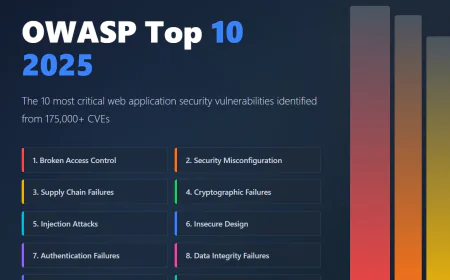
Why Security Misconfiguration Jumped to #2
In the 2021 OWASP Top 10, Security Misconfiguration sat at #5. In 2025, it's #2. This dramatic rise isn't because developers suddenly became careless. It's because our infrastructure became exponentially more complex and configurable.
Modern applications run on containers, serverless platforms, cloud services, microservices architectures, and distributed systems. Each component has dozens of configuration options. Each default setting is a potential security hole.
Every tested application showed some form of misconfiguration, with over 719,000 mapped CWEs (Common Weakness Enumerations).
The tragic truth: securing an application isn't just about writing secure code anymore. It's about correctly configuring every layer of the entire stack.
What Is Security Misconfiguration?
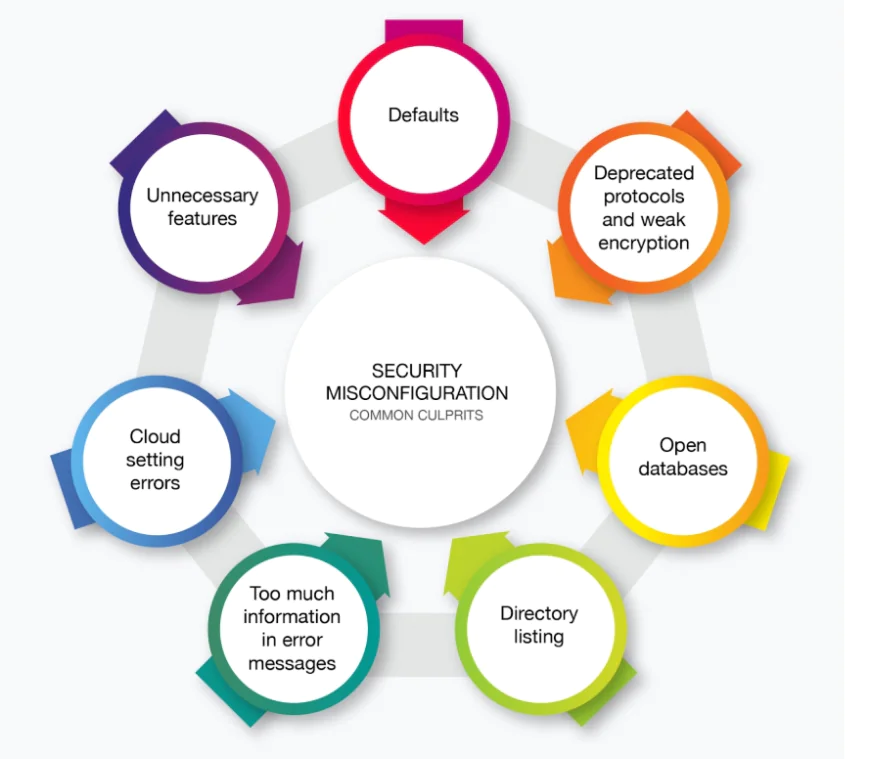
Security misconfiguration occurs when a system, application, or cloud service is set up incorrectly from a security perspective, creating vulnerabilities. This includes:
✅ Default accounts and unchanged default passwords still enabled on production systems
✅ Unnecessary features, services, ports, or frameworks enabled and installed
✅ Missing security hardening across the application stack
✅ Improperly configured permissions on cloud services
✅ Disabled security features or security features not configured securely
✅ Verbose error messages revealing sensitive information or system details
✅ Unremoved sample applications or testing code in production
✅ Missing or insecure security headers
✅ Directory listing enabled on web servers
✅ Debug mode enabled on production systems
Real-World Examples of Security Misconfiguration
Example 1: The Admin Console Default Credentials
An application server comes with sample applications not removed from the production server. These sample applications have known security flaws that attackers use to compromise the server. Suppose one of these applications is the admin console, and default accounts weren't changed. The attacker logs in with the default password and takes over.
This isn't theoretical. Countless production systems still run with:
- Tomcat with default credentials (tomcat:tomcat)
- Jenkins with no authentication enabled
- phpMyAdmin with default admin account
- AWS S3 buckets with public read/write access (accidentally)
An attacker simply tries known default credentials, gains admin access, and owns your entire system.
Example 2: Directory Listing Enabled
Directory listing is not disabled on the server. An attacker discovers they can simply list directories. The attacker finds and downloads the compiled Java classes, which they decompile and reverse engineer to view the code. The attacker then finds a severe access control flaw in the application.
This is a two-step attack:
Step 1: Access http://target.com/classes/ and see a directory listing with all Java bytecode files
Step 2: Download the files, decompile them using tools like JD-GUI or CFR, and read the source code
With source code in hand, finding vulnerabilities becomes trivial. Security researchers found this exact configuration exposing code in thousands of production systems.
Example 3: Verbose Error Messages
The application server's configuration allows detailed error messages, such as stack traces, to be returned to users. This potentially exposes sensitive information or underlying flaws, such as component versions that are known to be vulnerable.
A user submits a form that causes an error. Instead of a generic "Something went wrong", the application displays:
Exception in thread "main" java.sql.SQLException: Unknown database 'prod_db'
at com.example.database.Connection.connect(Connection.java:145)
at com.example.application.Main.main(Main.java:89)
SQL State: 42Y07
Error Code: 30000
An attacker now knows:
- The application uses Java and a specific JDBC driver
- The database is called 'prod_db'
- The exact file structure and method signatures
- Potential vulnerability vectors based on the framework version
Example 4: Cloud Storage Misconfiguration
Thousands of companies accidentally expose sensitive data because of misconfigured cloud storage:
- AWS S3 buckets set to public read/write instead of private
- Google Cloud Storage buckets with default permissions
- Azure blob containers with public access enabled instead of private
These misconfigurations expose customer data, financial records, and proprietary information.
Real-world incident: In 2024, a misconfigured S3 bucket exposed millions of user records from a SaaS company, resulting in a $50 million lawsuit.
Types of Security Misconfigurations
Application-Level Misconfigurations
- Debug mode enabled in production (exposes sensitive paths and variable values)
- Test endpoints exposed (endpoints meant only for testing, left in production)
- Unnecessary services installed (FTP, Telnet, SSH with weak default settings)
- Commented-out code containing credentials or sensitive information
- Logging credentials or API keys in application logs
- Storing secrets in source code instead of secure vaults
Web Server Misconfigurations
- Directory listing enabled (allows attackers to browse file structure)
- HTTP methods not restricted (PUT, DELETE enabled when they should be GET/POST only)
- Missing or weak security headers (no Content-Security-Policy, no X-Frame-Options)
- Outdated server software (Apache 2.2.x with known vulnerabilities)
- SSL/TLS misconfigured (wrong certificates, downgrade attacks possible, weak ciphers)
- Default pages not removed (server information pages still accessible)
Cloud Misconfigurations
- Open security groups allowing unrestricted inbound traffic
- Public IP addresses on database servers
- Unnecessary cloud services enabled
- Database snapshots with public access
- IAM policies with overly broad permissions
- Encryption disabled on storage buckets
Framework Misconfigurations
- Spring Boot actuator endpoints exposed to the internet
- Flask debug mode enabled in production
- Django ALLOWED_HOSTS set to '*' allowing any domain
- Express.js error handling revealing stack traces
- Rails config.consider_all_requests_local = true in production
Why Misconfiguration Happens
Complexity: Modern infrastructure is incredibly complex. A typical microservices architecture might have 100+ components, each with dozens of configuration options.
Speed Over Security: "Move fast and break things" mentality leads developers to use defaults and move forward without security reviews.
Lack of Automation: Manual configuration introduces human error. Each environment should be automatically hardened.
Configuration Drift: Initial configuration is secure, but over time changes accumulate. Database credentials get logged for debugging, never removed. Debug mode gets enabled temporarily, never disabled.
Unclear Defaults: Cloud providers and frameworks often choose convenience over security for defaults. Most users never change these defaults.
No Standardization: Different teams configure systems differently. No centralized hardening process ensures consistency.
Real-World Breaches Caused by Misconfiguration
Capital One (2019): Misconfigured WAF (Web Application Firewall) and security group allowed an attacker to access 106 million customer records. Simple misconfiguration, massive impact.
Facebook (2021): Customer data exposed through misconfigured cloud storage with public read access.
Microsoft (2021): Multiple Azure instances exposed due to misconfigured security settings, revealing millions of customer interactions.
Twitch (2021): Source code exposed through misconfigured GitHub repositories with public access.
How to Detect Misconfiguration
Manual Configuration Review
Audit every configuration file:
- Web server configs (nginx.conf, httpd.conf)
- Application configs (web.xml, application.yml, config.json)
- Cloud infrastructure templates (CloudFormation, Terraform)
- Container configurations (Dockerfile, docker-compose.yml)
- CI/CD pipeline configurations
Check for:
- Default accounts still enabled
- Unnecessary services running
- Debug mode enabled
- Missing security headers
- Weak permission settings
Automated Scanning Tools
OWASP ZAP: Automated scanner detecting missing security headers, outdated frameworks, default credentials
Nessus: Network vulnerability scanner finding misconfigurations
CloudMapper: AWS-specific scanner finding cloud misconfigurations
Scout Suite: Multi-cloud security auditing tool
Trivy: Container and vulnerability scanner
SonarQube: Code analysis finding configuration issues in code
Configuration Management Tools
Ansible: Check mode shows what would change without making changes
Terraform Plan: Shows configuration changes before applying
CloudFormation Drift Detection: Identifies configuration changes from intended state
Remediation and Hardening Strategies
1. Implement Automated Hardening
Create infrastructure as code templates with secure defaults:
```
# Example: Secure AWS S3 bucket configuration
AWSTemplateFormatVersion: '2010-09-09'
Resources:
SecureS3Bucket:
Type: AWS::S3::Bucket
Properties:
BucketName: secure-bucket-name
PublicAccessBlockConfiguration:
BlockPublicAcls: true
BlockPublicPolicy: true
IgnorePublicAcls: true
RestrictPublicBuckets: true
BucketEncryption:
ServerSideEncryptionConfiguration:
- ServerSideEncryptionByDefault:
SSEAlgorithm: AES256
VersioningConfiguration:
Status: Enabled
LoggingConfiguration:
DestinationBucketName: logging-bucket
LogFilePrefix: s3-access-logs/
```
Every new environment is deployed with secure defaults, not manual configuration.
2. Remove Default Accounts and Credentials
Change all default credentials immediately:
- Admin/admin → Strong unique password
- Test accounts → Deleted entirely
- Sample applications → Removed from production
Use a secrets management system:
- AWS Secrets Manager
- HashiCorp Vault
- Azure Key Vault
- 1Password Business
3. Disable Unnecessary Services and Features
Minimal platform approach: Install only what's needed.
Remove:
- Sample applications
- Debug endpoints
- Testing frameworks
- Unnecessary protocols (FTP, Telnet)
- Admin consoles that aren't needed
- Default web server pages
For example, if your Java application doesn't need Tomcat Manager, remove it entirely.
4. Implement Security Headers
Add headers that harden application security:
```
Content-Security-Policy: default-src 'self'; script-src 'self' 'unsafe-inline'; style-src 'self' 'unsafe-inline'
X-Frame-Options: DENY
X-Content-Type-Options: nosniff
Strict-Transport-Security: max-age=31536000; includeSubDomains
X-XSS-Protection: 1; mode=block
Referrer-Policy: strict-origin-when-cross-origin
```
These headers prevent common attacks like XSS, clickjacking, and MIME-type confusion.
5. Configure Proper Error Handling
Never expose stack traces or system information to users:
Bad:
Exception: java.sql.SQLException: Unknown database 'prod_db'
at com.example.database.connect(Connection.java:145)
Good:
An error occurred processing your request. Please try again later.
(Administrators: Check logs for details. Error ID: 12345)
Log detailed errors server-side where only administrators see them. Return generic messages to users.
6. Enable Comprehensive Logging and Monitoring
Log all configuration changes, access attempts, and errors:
- Who changed what configuration
- When the change occurred
- What was changed
- Approval status
Monitor for:
- Failed login attempts
- Configuration changes
- Unusual access patterns
- Security alerts
7. Enforce Configuration Consistency
Development, staging, and production should have identical configurations except for:
- Credentials (different for each environment)
- Logging levels (production logs more than development)
- Resource limits (production has higher limits)
Everything else should be identical, enforced through infrastructure as code.
8. Regular Security Audits
Quarterly or semi-annual reviews:
- Audit all production configurations
- Check for drift from approved baseline
- Verify security headers are present
- Confirm debug mode is disabled
- Review cloud permissions
- Test default credentials don't work
The OWASP Guidance
OWASP recommends:
- Implement a repeatable hardening process making it fast and easy to deploy properly locked-down environments
- Maintain a minimal platform without any unnecessary features, components, documentation, or samples
- Review and update configurations as part of patch management
- Implement secure installation processes that are automated and verifiable
- Define and enforce a security baseline across development, QA, and production
- Use configuration management tools to ensure consistency
- Monitor for configuration drift and alert when changes occur
Conclusion
✅ Security Misconfiguration rose from #5 to #2 in the OWASP Top 10 2025 because our infrastructure has become exponentially more complex. The good news: misconfiguration is entirely preventable through proper processes, automation, and vigilance.
✅ The bad news: it requires discipline. It's tempting to accept defaults and move fast. It's tempting to enable debug mode temporarily and forget to disable it. It's tempting to leave sample applications in place because removing them takes effort.
✅ But each of these small compromises multiplies across a large infrastructure, creating massive security gaps.
✅ Organizations that win implement automated hardening, use infrastructure as code for consistency, monitor for configuration drift, and make security part of the deployment process not an afterthought.